

If a customer stops replying, close the ticket without pretending the issue was definitely solved or making the customer feel at fault. Name the request, state the last contact date, explain what will happen, and give the customer a clear route back.
Use this version when you need a closing ticket due to no response template now:
Subject: Closing support request #[ticket ID] for now

Hi [customer name],

We have not heard back about [short issue summary] since [last contact date],
so we will close this support request for now on [close date].

If you still need help, reply to this email [within X days / at any time].
We will [reopen the ticket / create a linked follow-up] with the conversation
history attached, so you will not need to explain the issue again.

Thanks,
[agent name]
[company support team]
Closing is one stage of a ticket. For the replies before it, from the first acknowledgment to refunds and escalations, see our customer support email templates.
Change the reopening sentence to match your help desk. Some systems reopen a solved ticket, while others create a linked follow-up after the ticket reaches its final closed state.
Key Takeaways
- Tell the customer before the ticket closes. A silent status change is clean for the queue and confusing for the person who asked for help.
- Treat “waiting on the customer,” “resolved,” and “closed” as different states. No response does not prove the issue was fixed.
- Use exact dates. “We will close this soon” creates avoidable uncertainty.
- Explain whether replying reopens the ticket, creates a follow-up, or requires a new request.
- Stop any automated closure sequence when the customer replies or the case becomes high risk.
The copy-ready closure template
A useful ticket closure email does five jobs in about 70 words: identifies the request, records the last contact, states the action, gives the date, and explains how support can resume. The standard template above works because it covers all five without blaming the customer or padding the message with generic apologies.
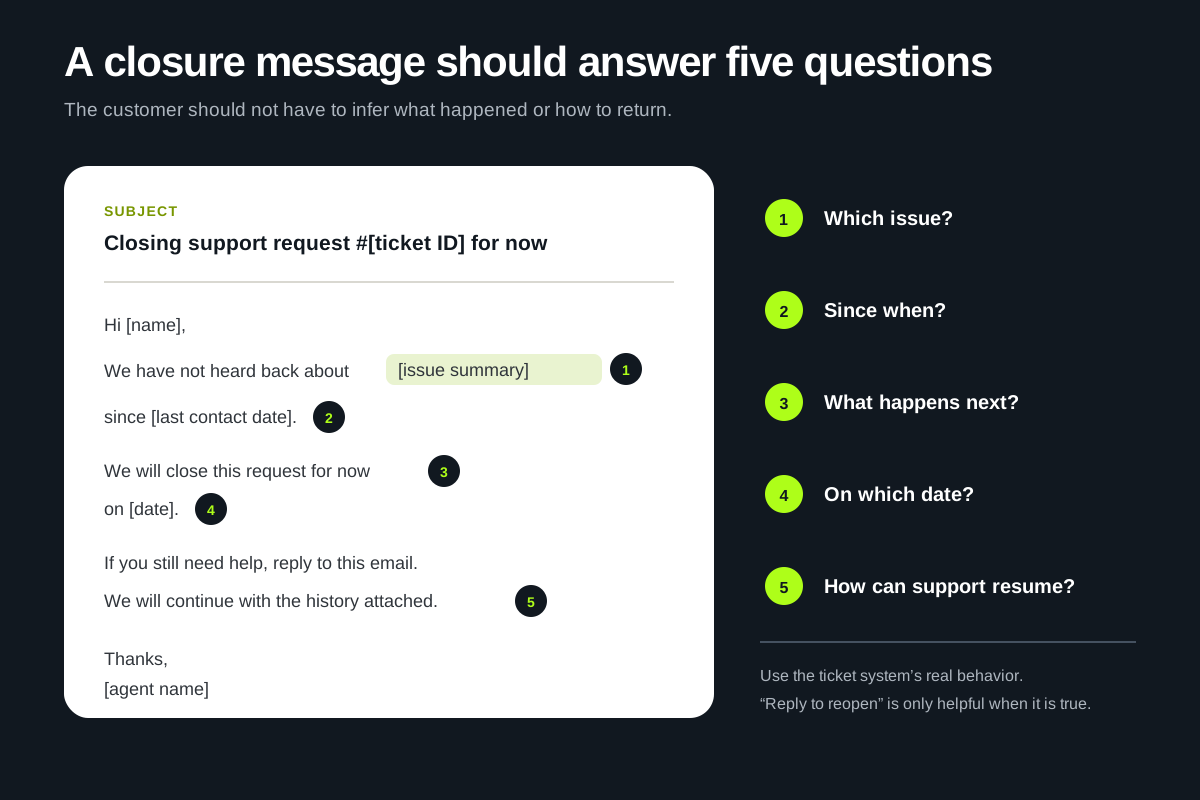
The phrase “for now” is useful when the customer can return to the same thread. It signals an operational close, not a refusal to help. Remove it when policy or tooling makes the closure irreversible, and tell the customer how to open a new request instead.
Avoid claiming the issue is resolved unless an agent supplied a fix and has reasonable evidence that it worked. “We have not heard back, so we assume this is solved” sounds efficient, but the assumption may be false. A better status label is “closed due to inactivity” or “closed while awaiting customer information.”
When should you close a ticket for no response?
For ordinary, non-urgent support, a sensible starting policy is two follow-ups over five business days, followed by closure on day seven. The right window depends on urgency, customer expectations, contract terms, time zones, and whether the customer must perform a complex task before replying.
Major help desks use different defaults. Zendesk documents a default automation that moves a solved ticket to closed after four days and calls three to five days a common best-practice window. A requester can reopen the ticket while it is solved, but a reply to a fully closed ticket creates a follow-up instead. Zendesk, “What is the difference between a solved ticket and a closed ticket?”
Atlassian's IT service management template auto-closes resolved requests after three business days. That delay gives the customer a chance to respond before the final transition. Atlassian, “Auto-close resolved service requests”
Intercom recommends snoozing a conversation while waiting for an answer and says a week without a response can justify closing it, provided the customer is told what is happening and how to return. Intercom, “Close a conversation”
Those examples do not produce one universal deadline. They show the shared pattern: use an intermediate state, allow a meaningful response window, and keep the path back explicit.
| Situation | Starting cadence | Why it may need more time |
|---|---|---|
| Routine product question | Follow up on day 2, final notice on day 5, close on day 7 | Weekends, time zones, or a customer who needs to test the answer |
| Technical troubleshooting | Follow up after the promised test window, then again two to three business days later | Logs, access approval, deployment windows, or another technical owner |
| Billing or refund request | Follow up within one to two business days and state any real policy deadline | Documentation, payment-provider review, or financial controls |
| B2B account issue | Match the contracted response process and named account contacts | Procurement, multiple stakeholders, or an agreed escalation route |
| Safety, security, access, legal, or active payment incident | Do not use a routine inactivity timer | The business may still have an obligation to investigate or act |
The clock should start when the team asks for a specific customer action, not when the ticket was created. If the last support message said only “Let us know if you need anything else,” closing two days later may be fine. If it asked the customer to reproduce a bug in their next release window, the same deadline would be careless.
A no-response follow-up sequence
Write the sequence before you write twelve isolated macros. Each message should move the case into a clearer state, not repeat the previous email with a new subject line.
- Day 0: ask for one clear action. Summarize what you need and why. Set the ticket to waiting on the customer or the closest equivalent.
- Day 2: make the next step easier. Repeat the missing item in one sentence. Link to instructions or offer an alternative if the original request was difficult.
- Day 5: send the final notice. Name the exact closure date and explain what a reply before then will do.
- Day 7: close for now. Record the inactivity reason and tell the customer how to resume without starting from zero.

The example cadence is a policy starting point, not a hidden rule to apply to every queue. Document the exceptions beside the automation. A customer engagement strategy is only useful when ownership and escalation rules survive the moment a neat workflow meets a messy customer situation.
12 closing ticket due to no response templates
These support ticket response templates cover different stages and situations. Replace every bracketed field, remove any sentence your system cannot honor, and read the result aloud before saving it as a macro.
1. Standard closing ticket due to no response email
Use this for an ordinary support request after the customer has missed the stated follow-up window.
Subject: Closing support request #[ticket ID] for now

Hi [customer name],

We have not heard back about [issue summary] since [last contact date].
We will close this request for now on [close date].

If you still need help, reply to this email [within X days / at any time].
We will [reopen the ticket / create a linked follow-up] and keep the earlier
conversation attached.

Thanks,
[agent name]
2. Short and friendly closure
This version fits a product with a conversational support voice. It still names the consequence and route back.
Subject: We will close this request for now

Hi [customer name],

I have not heard back about [issue summary], so I will close this request on
[close date] for now. If you still need a hand, reply here and we will pick up
with the conversation history in place.

Thanks,
[agent name]
3. Formal B2B or service-desk closure
Use this where the ticket ID, dates, and closure reason need to remain easy to audit.
Subject: Support request #[ticket ID] — closure due to inactivity

Hello [customer name],

Our last message regarding [issue summary] was sent on [last contact date].
As we have not received the requested [information / confirmation], ticket
#[ticket ID] will be closed due to inactivity on [close date].

To continue the request, please [reply within X days / open a new request and
reference ticket #[ticket ID]]. The previous case history will remain available
to our support team.

Kind regards,
[agent name]
[team or department]
4. First follow-up after asking for information
Do not mention closure in the first reminder unless the original message already set that expectation.
Subject: One detail needed for support request #[ticket ID]

Hi [customer name],

I am following up on [issue summary]. To continue, I need [specific information
or action]. You can [short instruction or link].

If that is difficult to provide, reply and tell me where you are stuck. I can
suggest another route.

Thanks,
[agent name]
5. Second follow-up with a simpler next step
Use the second reminder to reduce effort. Repeating the whole troubleshooting history rarely helps.
Subject: Still need help with #[ticket ID]?

Hi [customer name],

We are still waiting for [one missing item] before we can continue with [issue
summary]. A reply with [minimum acceptable answer] is enough for the next step.

If the issue has already cleared up, no action is needed. Otherwise, send that
detail by [date] and we will keep working on the request.

Thanks,
[agent name]
6. Final notice before closing
The final notice should contain an exact date. It should not sound like a threat designed to force a reply.
Subject: Final follow-up before we close #[ticket ID]

Hi [customer name],

We have tried to reach you about [issue summary] and are still waiting for
[information or confirmation]. Unless we hear from you by [date and time with
time zone], we will close the ticket for now.

If you need more time, reply with a date that works for you. We can leave the
request pending until then.

Thanks,
[agent name]
7. Three-strike closure template
Use this only when a published policy or internal service-desk process requires three attempts. List the contact dates instead of writing “we contacted you several times.”
Subject: Ticket #[ticket ID] closed after three contact attempts

Hello [customer name],

We contacted you about [issue summary] on [date 1], [date 2], and [date 3] but
did not receive the information needed to continue. We have now closed ticket
#[ticket ID] as awaiting customer response.

If you would like to resume, [reply to reopen / create a new request and include
this ticket ID]. We will use the existing history so you do not have to repeat
the earlier steps.

Regards,
[agent name]
8. Technical support waiting for logs or a reproduction
Technical work often needs a longer response window because the customer may need an administrator or deployment window.
Subject: Waiting for diagnostics on #[ticket ID]

Hi [customer name],

To continue investigating [issue summary], we still need [log, timestamp,
version, or reproduction step]. Please remove secrets or personal data before
sending it through [approved secure channel].

We will keep the ticket pending until [date]. If we do not hear back, we will
close it for now. Reply later and we can continue from the same investigation.

Thanks,
[agent name]
9. Account access or identity-check request
Never ask a customer to send passwords, full payment details, or identity documents through an unapproved email channel.
Subject: Action needed to continue account request #[ticket ID]

Hi [customer name],

We cannot continue with [account request] until [approved verification step]
is complete. Please use [secure verification link or in-product route]. Do not
send passwords or full payment details by email.

If verification is not completed by [date], we will close this request without
making changes to the account. You can start again through [safe route].

Thanks,
[agent name]
10. Billing or refund request missing information
State any real policy deadline plainly. Do not invent urgency to clean up the queue.
Subject: Information needed for billing request #[ticket ID]

Hi [customer name],

We are ready to review your request about [charge, invoice, or refund], but we
still need [order number, invoice ID, or other approved detail]. Please do not
send full card or bank information.

Send the detail by [date]. If we do not hear back, we will close this ticket for
now. [Any genuine policy deadline and what it affects.] You can reply later to
[reopen the ticket / create a linked follow-up].

Thanks,
[agent name]
11. Ecommerce order, delivery, or return request
This template separates closing the support record from the status of the order or return.
Subject: Update needed for order support request #[ticket ID]

Hi [customer name],

We are waiting for [order number, delivery photo, return tracking, or preferred
resolution] to continue with [issue summary]. The support ticket will close on
[date] if we do not receive it.

Closing the ticket does not [cancel the order / approve the refund / change the
return deadline]. If you still need help, reply with [required detail] and we
will continue from the existing conversation.

Thanks,
[agent name]
12. Solution sent, but the customer did not confirm
Use “resolved” only if the team supplied a plausible fix. Record that confirmation is missing.
Subject: Closing #[ticket ID] after sending the fix

Hi [customer name],

On [date], we sent [short description of the fix or answer] for [issue summary].
We have not heard whether the problem returned, so we will mark the ticket
resolved and close it on [close date].

If the fix did not work, reply [within X days / at any time]. We will [reopen
the ticket / create a linked follow-up] with the troubleshooting history
attached.

Thanks,
[agent name]
Closing a ticket you cannot reproduce
A "cannot reproduce" closure is different from a no-response closure: the customer may have answered every question, and the team still could not make the problem happen. Say what you tested, say what would let you continue, and keep the case easy to reopen.
Subject: We could not reproduce the issue in #[ticket ID]

Hi [customer name],

Thanks for the details about [issue summary]. We tested it on [environment:
browser, device, app version, account type] using the steps you shared, and
the problem did not happen for us.

Without a way to reproduce it, we will close this request on [close date].
If it happens again, reply here with [the time it happened / a screen recording /
the exact error message], and we will reopen it with everything we have tried
so far.

Thanks,
[agent name]
Before sending it, record the environment you tested and the steps you followed in an internal note. If the same "cannot reproduce" report arrives from another customer, link the two tickets; a pattern across customers is often the missing clue.
Subject lines for no-response ticket closures
The subject line should help the customer recognize the request and understand whether action is still possible. Keep the ticket ID when customers may have several open cases.
- Action needed for support request #[ticket ID]
- One detail needed to continue #[ticket ID]
- Still need help with #[ticket ID]?
- Final follow-up before we close #[ticket ID]
- We will close support request #[ticket ID] on [date]
- Closing support request #[ticket ID] for now
- Ticket #[ticket ID] closed due to inactivity
- Ticket #[ticket ID] closed while awaiting your response
- Reply to continue support request #[ticket ID]
- Information needed for [issue summary]
Avoid “Case closed” when the customer still has time to reply. Avoid “Urgent” unless there is a real deadline with a real consequence.
How to personalize a ticket closure template
A personalized closure message reflects the work already done and the one decision still open. A customer's first name on a generic paragraph does not accomplish that.
Replace these fields before sending:
- Issue summary: use the customer's language in one line. “Export fails after 80%” is better than “your technical issue.”
- Last contact date: record the most recent customer-visible message, not an internal note.
- Missing action: ask for one specific log, answer, approval, or test result.
- Closure date and time zone: make the deadline easy to interpret.
- Status behavior: say whether a reply reopens, creates a follow-up, or requires a new ticket.
- Existing work: preserve the troubleshooting steps, account context, and attachments that the next agent will need.
A shared support inbox should keep the thread, owner, customer record, and internal notes together. The closure message is only as useful as the history waiting behind it when the customer returns.
Read the template once without the bracketed fields. If the message could be sent to any customer about any issue, it is not ready. Add one concrete summary or remove a generic sentence.
Ticket closure validation: check before you close
Ticket closure validation is the last check that a ticket is ready to close: the status is right, the customer was told, and the next person can pick it up if it returns. Run it for manual and automated closures alike.
| Check | Question to answer | If it fails |
|---|---|---|
| Reason | Is the closure reason "resolved", "no response" or "cannot reproduce", and is it the true one? | Change the reason. Never mark silence as resolved. |
| Last request | Did the latest public reply ask for one clear action? | Send a clearer follow-up before closing. |
| Notice | Did the customer get a dated closure notice? | Send the final notice and reset the date. |
| Open work | Is any refund, investigation, order or promised action still pending? | Keep the ticket open and assign the owner. |
| Risk tags | Does it involve security, payments, legal or safety? | Route to a person; skip automatic closure. |
| Route back | Does the closure message say how to reopen? | Add the reopening sentence. |
| History | Are notes, attachments and steps tried saved on the ticket? | Add an internal summary before closing. |
When not to close an unresponsive ticket
An inactivity rule helps manage the queue and still requires judgment. Pause or bypass it when:
- the issue involves active security exposure, account compromise, safety, legal obligations, or a payment still in motion;
- the team promised an action and has not completed it;
- an internal engineering, carrier, vendor, or billing investigation is still open;
- the customer needs a reasonable accommodation or a slower communication channel;
- the deadline conflicts with a contract, refund window, service-level agreement, or regulatory process;
- the customer gave a return date, travel date, maintenance window, or other reason for the delay;
- the latest message asked for something difficult without explaining how to provide it safely.
Do not close a ticket because the assigned agent is going away. Reassign it. Do not mark a case solved to improve resolution metrics. That only moves unfinished work out of sight.
How to automate no-response closures safely
Use a reviewed policy as the source of every automation rule. A safe workflow checks the ticket state, time since the last customer-visible request, risk tags, SLA, and whether the customer replied before each message.
IF status is "waiting on customer"
AND the latest public agent reply asked for a specific customer action
AND no customer reply arrived after the approved wait period
AND no high-risk, VIP, legal, security, payment, or active-investigation tag applies

THEN send the next follow-up in the sequence

BEFORE closure
- send a final notice with an exact date
- stop if the customer replies
- record "closed due to inactivity" as the reason
- preserve the owner, history, and route back
Test the rule on a small queue before applying it everywhere. Review examples of both correct closures and cases the rule should have skipped. The automation log should show which condition triggered each message and closure.
Conecto's support ticketing keeps priorities, categories, ownership, and replies in the same workspace as chat. Automations can handle repeat steps, while the AI support agent answers from approved content and hands cases to a person when judgment or account access is required.
Best practices for closing tickets with no customer response
These practices summarize the guide into a policy a team can adopt as written:
- Use a waiting state. Move the ticket to "waiting on customer" and stop SLA timers there, so the queue shows who owes the next step.
- Ask for one thing. Each follow-up should request a single, specific action the customer can complete.
- Follow up twice, then warn. Two reminders and a dated final notice cover most customers without nagging.
- Give exact dates. "We will close this on Thursday, October 8" is clearer than "in a few days".
- Close with the right reason. Record "closed due to inactivity", not "resolved", unless a fix was delivered.
- Keep the door open. Say whether a reply reopens the ticket or creates a linked follow-up.
- Stop on any reply. An automated sequence must end the moment the customer writes back.
- Exclude risky cases. Security, payment, legal and active investigations need a person's decision.
- Review reopened tickets monthly. Returns tell you whether the timing and wording work.
For the replies that come before a closure, from the first acknowledgment to refunds and escalations, use our customer support email templates.
What to measure after closing inactive tickets
Queue size alone cannot tell you whether the policy works. Track a small set of measures that reveal false closures and customer effort:
| Measure | What it reveals | What to investigate |
|---|---|---|
| Reply rate after first follow-up | Whether customers notice and can act on the request | Low rates may indicate a vague question, weak delivery, or an unrealistic request |
| Reply rate after final notice | Whether the closure warning prompts legitimate returns | A sharp spike may mean the earlier reminder was too easy to miss |
| Reopen or linked follow-up rate | How often “inactive” cases were still live | Segment by issue, team, closure timing, and template |
| Time from waiting to closure | Whether the policy is applied consistently | Very short or very long tails often signal manual workarounds |
| Repeat contact about the same issue | Whether history survives the return | Review cases where the customer had to restate the problem |
| CSAT after resumed cases | How the return experience feels | Compare resumed cases with cases that never entered the closure sequence |
Read a sample of the reopened conversations each month. A customer may return after a reasonable delay, so a reopening alone does not signal failure. Treat forced restarts, closure before the promised date, and silence recorded as resolution as policy failures.
Frequently asked questions
How long should you wait before closing a ticket due to no response?
For an ordinary support request, start with two follow-ups over five business days and closure around day seven. Shorter or longer windows can be reasonable. Match the timing to urgency, SLA, time zones, the effort required from the customer, and what your team promised. Zendesk documents three to five days as a common window after resolution, while Intercom describes a week without a reply as a point at which closing a snoozed conversation may be appropriate.
How many times should support follow up before closing a ticket?
Two follow-ups are enough for many queues: one reminder and one final notice. A three-strike process fits teams that require three documented attempts. More messages are not automatically better. Each attempt should add clarity, reduce the work required from the customer, or state the closure decision.
What does “ticket closed due to inactivity” mean?
It means the support team ended the active ticket because the customer did not reply within the stated period. It does not necessarily mean the underlying issue was fixed. The closure message should explain whether the customer can reply to reopen the ticket, receive a linked follow-up, or must submit a new request.
Should a no-response ticket be marked solved or closed?
Use the status that truthfully describes your workflow. “Waiting on customer” fits the response window. “Resolved” fits a plausible solution that was delivered but not confirmed. “Closed due to inactivity” fits a final operational state where requested customer input never arrived. Help desks implement these states differently, so document the customer-visible meaning rather than relying on the label alone.
Can a customer reopen a closed ticket by replying?
It depends on the help desk and its settings. Some products reopen a solved or recently closed thread. Others keep the closed ticket immutable and create a linked follow-up. Test the behavior before promising “reply to reopen” in a template.
What should the final closure email include?
Include the ticket ID or issue summary, the last contact date, the missing customer action, the exact closure date, what status will be applied, and how the customer can resume. Keep internal queue language out of the email unless it helps the customer understand what happens next.
How do you close a ticket you cannot reproduce?
Tell the customer what you tested and on which setup, ask for the one detail that would help (an exact error, a time or a recording), give a closure date, and explain how to reopen. Link it to similar reports from other customers.
What is ticket closure validation?
It is the final check before a ticket closes: the closure reason is accurate, the customer received a dated notice, no promised work is pending, risky cases went to a person, and the history is saved for whoever picks it up next.
Can AI write ticket-closure emails?
AI can draft from an approved template and insert ticket context, but the workflow must control dates, status transitions, sensitive-data requests, exceptions, and the reopening promise. The agent should not invent a resolution or close a high-risk case because the conversation went quiet.
Put one cadence into writing, test every status transition, and review the first month of reopened cases. If the customer can return without repeating the story, the closure process is doing its job. See how Conecto handles support tickets, or start free to test the workflow in your own workspace.